
When a scan becomes a searchable PDF
June 17, 2026
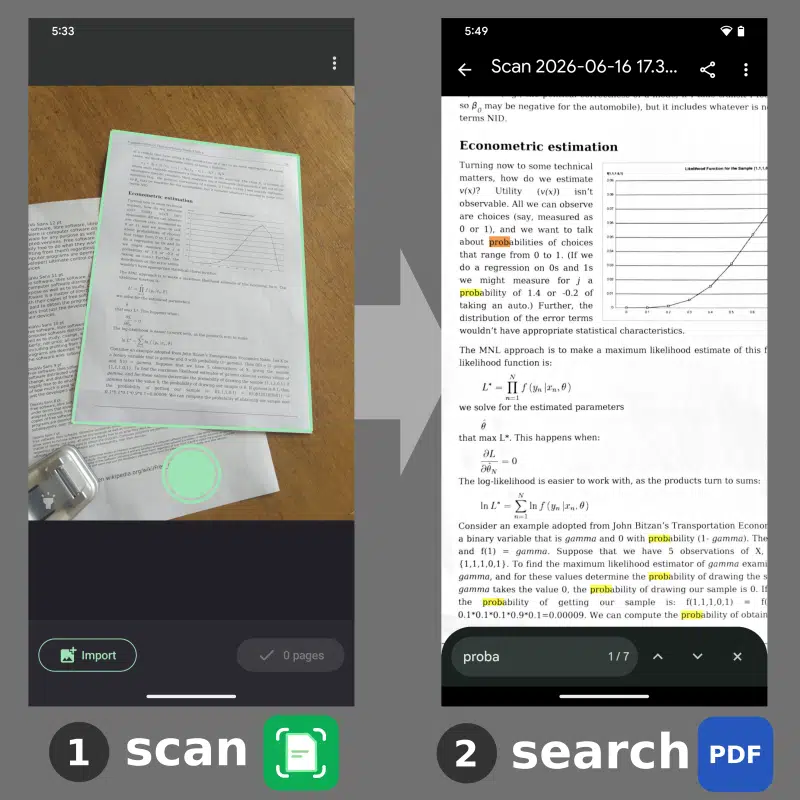
Let's say that you signed a 5-page work contract. You have a paper document but no electronic version. Now you want to find a particular clause in the contract. How can you find it quickly? If you scan it with FairScan, you can now get a PDF which you can directly search for text. You may also copy any text from it, for example the paragraph you were looking for, and paste it in another application. This is the result of a text recognition system, which is often referred to as OCR (Optical Character Recognition).
An invisible text layer
When you scan a document, what you get is basically an image of the document. It's often stored in a PDF file and your PDF viewer displays this image, containing the pixels of a signature, the pixels of a logo, or the pixels that make the characters of a word. But to your PDF viewer, it's just the pixels of an image, and you can't search for text.
OCR is about identifying which pixels belong to text and reconstructing the text information they contain: which words and where they are located. The PDF file can then contain both the image and an invisible text layer. That's the recipe for a useful illusion:
- You still see the document exactly as it is in the image
- When you search for text, your PDF viewer highlights an area where you see a word that matches your search
- When you point at an area of the image where you see a word, the cursor lets you select the word and copy it
Now you know the trick! And getting searchable PDFs like that out of FairScan is what I wanted to do.
Why now?
That looks nice, so why didn't FairScan have it before? That's because FairScan wasn't ready for it: I wouldn't be comfortable if FairScan was giving you wrong text half of the time. To get good results from an OCR engine, you need to provide it a readable image. If it's hard to read for a human, it's certainly also hard to read for an OCR engine.
Over the past year, I worked on different parts of FairScan's automatic processing to transform photos of documents into PDFs that are easy for humans to read:
- document detection
- perspective correction
- shadow reduction
- brightness and contrast enhancement
All this work on image processing helped FairScan produce clean PDFs and can now also contribute to making text recognition effective.
Implementing OCR in FairScan
Developing an OCR engine is quite hard. It was definitely out of the question for FairScan. I use Tesseract, an open source project that was initiated 40 years ago at HP.
Tesseract can be integrated easily into an Android app and covers about 120 languages. To avoid increasing drastically the app download size, language-specific data is not included in the app: you will have to download it separately for each language in FairScan's settings screen.
Like all the other parts of FairScan's scanning process, OCR runs on your device: your data is not sent to any server to be processed. This is unlike many mobile apps that rely on cloud processing to achieve the same task. On a mobile device, OCR typically takes a few seconds per page. That's significantly more than the other processing steps in FairScan, but still fast enough to remain practical for everyday scanning.
The challenge of PDF fonts
Making Tesseract run inside FairScan wasn't particularly difficult. Generating PDFs that work reliably across different writing systems turned out to be much harder.
PDF files need to know about fonts, fonts that cover the characters used in the file. Which font should FairScan use to generate PDFs? Tesseract can read many languages like English, Russian or Chinese. So we need a font for the latin alphabet, the cyrillic alphabet or Chinese characters. Fonts can be huge and that could impact both the app download size and the size of the generated PDFs. The irony is that, for invisible text, users never see the characters produced by the font. But PDF still needs a font for the text.
My research led me to the Adobe NotDef font: it renders all Unicode characters (covering all writing systems) the same way. As it's a tiny file, it looked like a good solution to avoid file size issues. However, because this font covers so many characters, the library I use to generate PDFs takes a couple of seconds to load it on my phone. I didn't manage to solve that and looked for another solution.
In fact, Tesseract itself can render PDFs. It faces the exact same problem and found a solution for it based on a kind of fake font. I couldn't use that directly because FairScan needs direct control on the PDF, for example to feed information about the physical dimensions of the document. But I took a lot of inspiration from what Tesseract does to generate PDF files. It requires hand-crafting PDF, which I never did before, but it works: it produces PDFs for all kinds of characters very fast and with a tiny font.
Keeping it simple
The technical solution I worked on for OCR was less important to me than how OCR should impact user experience. And it was clear to me that this impact should be minimal. OCR is not FairScan's core feature, and I didn't want OCR to break FairScan's main promise: its simplicity.
So the way OCR appears in FairScan's user interface is basically as an option to enable. More precisely, you choose which languages are enabled. Once it's done, OCR runs transparently, as part of the export. Nothing changes in the scanning process. The difference is in the generated output: you get a PDF where you can search and copy text.
Enabling more than one language for OCR makes it possible to extract text in multilingual documents. Be aware that processing may be slower and less precise. You can also disable all languages: that effectively disables OCR.
Known limits
It's not perfect and it's not as simple as I wish it was. I like everything to be automatic in FairScan but there is no automatic language detection. You have to enable the appropriate language(s) to get good results. I guess that shouldn't be a big problem: I expect that almost all documents you scan are always in the same one or two languages.
Also, let's state it clearly: you shouldn't expect to get acceptable results on handwritten text. That's a much harder problem and I believe it would go beyond FairScan's scope.
I also expect OCR quality to improve gradually over time. I already noticed that detection is poor on documents with very dense text, for example dictionary pages. I hope user feedback will help identify other cases that need attention.
A scanned document is often more useful when it can be searched, copied, and indexed like any other digital document. OCR makes that possible. FairScan's goal is still the same: turning paper documents into useful PDFs. OCR doesn't change that goal. It simply makes those PDFs more useful once they've been created. Still, OCR is often perceived as an "advanced feature". I hope that FairScan can contribute to bringing it to more people, in a simple and respectful way.