
Keeping FairScan simple isn't simple
July 31, 2026
I present FairScan as a "simple and respectful" app. But those are not just words to talk about FairScan, they are key values that drive development. I dedicated one of my first blog posts to explain what I see as a "respectful" app and I think that "simple" also deserves a few explanations.
What I mean by "simple"
Let's first clarify what I mean when I describe FairScan as a "simple" app.
Essentially, I'm trying to make an app that's as easy to use as possible. For an app like FairScan, the scanning process should be straightforward and require a minimal number of actions from users. I believe that an app with few buttons and options makes it easier for users to get the job done.
That's more likely to happen for an app that focuses on doing one thing. FairScan is about scanning documents. It's not about storing them or editing them. Storing user data implies some responsibility and I think it's better handled by a dedicated app. Users can combine apps that have a small but well-defined scope: the Android system provides an infrastructure to make that fluid.
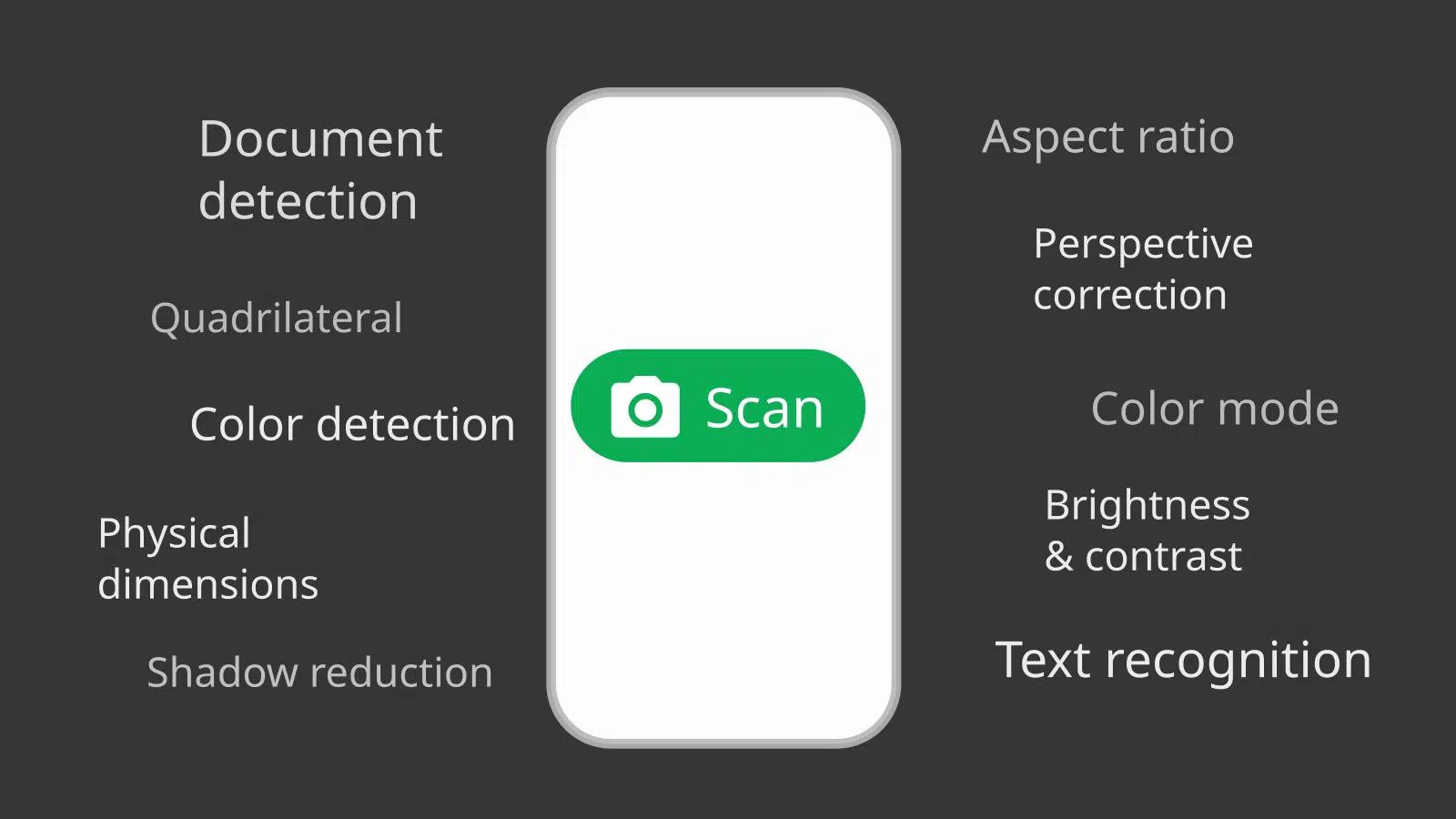
I should also make it clear that what I mean by "simple" is definitely not "basic". I put a lot of effort in automatic processing so that users can get a good scan without any manual adjustment. The app takes care of document detection, perspective correction, color detection, brightness and contrast enhancements... What you see today took me a lot of research and testing so that users can "get a scan" without having to think about what it involves behind the scenes. So the fact that FairScan is simple for users certainly does not mean that it's simple to develop.
Overall, I think that my goal for a simple app is to reduce the mental load for users as much as possible.
Why building a simple app
The main reason for me to build a simple app is that I'd like it to be usable by everyone. My goal is that FairScan is not only used by advanced users who know where to find respectful apps. It's therefore crucial that it's easy to use.
It's also because that's the kind of app I want to use. When I have to scan a document, it's often for administrative purposes and I don't want to think about it, I just want to get a result fast. I'm sure many people feel the same: they don't enjoy scanning documents, they just want to get the job done with a tool that stays out of the way.
I also enjoy looking deeply at a problem, understanding its essence, and figuring out how to present it as clearly as possible.
For all those reasons, I think a simple app is the only kind I could build.
It's a deliberate choice that has been driving FairScan's development since its inception. It's a major driver for every decision and it's really about favoring clarity and ease of use over PDF perfection and manual control.
Let's look at how that drives FairScan's development.
A continuous quest for simplicity
The app evolved a lot since its first public version. At the time, FairScan's workflow required users to go through 4 screens to get a scan. At some point, I received a request from someone who was using the app to scan many documents one after another and would have liked a specialized workflow requiring less clicks. I was reluctant to add an option for that and I started to think about how to make the workflow simpler for everyone.
I made changes in that direction in several steps.
- The screen to preview the result and adjust it looked like a questionable step of the workflow. It's useful in some cases but the app is supposed to give a good result without adjustment. The screen now only appears when tapping a thumbnail and I believe that makes more sense.
- The app always displayed a home screen on startup, and the end of the scanning workflow also led back to that screen. It contained a list of previously saved PDFs which was raising questions. I dropped the home screen.
It's not a flawless process though. I had to reintroduce an explicit choice on startup to resume an ongoing scan when there's one: the removal of the home screen had made that choice implicit and that prevented new users from understanding what a "scan" means in FairScan.
The result is that there are now only 2 screens left in the scanning workflow. Over the past year, FairScan improved on many aspects but it's now also simpler for everyone.
Adding features and keeping it simple
The app also had to provide more and more value to users, and I didn't want that to impact how simple it is.
As an example, FairScan used to produce PDFs without caring for the physical dimensions of documents until recently. That was a problem, at least in some cases, and users asked for a way to force a PDF paper format such as "A4" or "Letter". I worked on a different way to address that problem that seemed more aligned with FairScan's approach. I found technical ways for the app to detect physical dimensions in many cases. As a result, FairScan is now able to detect standard formats such as A4 and generate PDFs that include this information in a fully automated way.
That raises the question of what's a "feature". Users asking for new features usually expect to get new buttons or new options. In the case I just described, nothing changed in FairScan's user interface, the only visible impact is the generated PDF. All users benefit from this new ability without having to do anything about it. It's a kind of feature that many people will never notice.
Simple vs. user control
Some requests don't have such a clean answer.
Quite a few people came to FairScan because it's respectful, in particular it doesn't suck up user data or display ads, which is not very common. People who care for that want control over the apps they install. The problem is that it's harder to make an app that's both simple and gives a lot of control to users. That requires additional buttons or options and it makes the user interface more complex. Of course, it also makes the app more complex to develop and maintain.
I felt this tension only a few weeks after releasing version 1, when early adopters requested the ability to manually define document edges. That's something I didn't want to do. I saw automatic document detection as the basis of FairScan's value, what makes it possible to build a simple app to scan documents. I knew what I had implemented was far from perfect and I wanted to get feedback to improve it. Unlike other aspects of a scan (for example: brightness), document edges are not a question of personal preference: they're either right or wrong. For me, introducing a manual control meant giving up on that and acknowledging that FairScan can't be what I want it to be.
I resisted for a long time. I worked a lot on automatic document detection: I looked for a different segmentation model, produced hundreds of new images for the dataset, and researched a new algorithm to make a quad out of a segmentation mask. I believe the app got significantly better.
And yet, for some users, it was still a source of frustration, and I could feel it. I received carefully written requests but also 1-star reviews on the Play store, and GitHub comments explaining to me the basic principles of software development and user experience. I can't say I'm indifferent to that.
I resisted up to version 1.21.0, when I received a very well-crafted contribution (thank you Philipp Hasper!) that implemented a new screen to manually define document edges. As the screen to preview and adjust the scan was now out of the main workflow, I felt it was acceptable to add a button for that.
I guess that's the kind of tradeoff I have to accept if I want FairScan to reach some day a wider audience.
Standing by simplicity
A simple app is still the only kind I'm interested in building and it's been a key value since I started FairScan. The result is an app that's "not impressive" (as I sometimes read), at least at first sight. I also had to say "no" to some feature requests. And I know many people associate "simple" with "low value". The real challenge for me is to be comfortable with that. Simplicity is almost invisible. When it succeeds, people rarely notice it, they simply get their work done. That's exactly what I'm aiming for. I spent a lot of effort so that users can get a good scan without thinking about what it takes. I'm not sure I'll always make the right call on where to draw the line, but I want FairScan to be an app that "just works".