FairScan icon

FairScan

An Android app to scan your documents —
simple and respectful.

“The Simplest Android App for Scanning Documents.” WIRED

FairScan screenshot

Why FairScan?

Simple

Scanning a document should never feel complicated. With FairScan, you get a clean PDF in just a few seconds. The application guides you through a straightforward process so you can focus on your document, not on the tool.

  • Easy flow: scan, review if needed, save or share

  • Clear, distraction-free interface

  • Automatic document detection, crop, and enhancement

  • Instant share: One tap to export a shareable PDF

  • OCR included: get searchable, copy-paste ready PDFs.

Respectful

FairScan was built on a simple principle: it should serve the interests of its users, not the interests of a business. Its features and code were designed with that perspective in mind.

  • Privacy: your scans stay on your device. No cloud, no account, no trackers.

  • Focus: no ads, no nagging to upgrade, only what you need.

  • Freedom: no watermarks, no page limits, no restrictions on sharing.

  • Transparency: open-source code, open to review.

  • Minimal permissions: only what is required for scanning, exporting PDFs, and optional OCR language downloads.

How it works

Step 1: Detect document

1. Point your phone – FairScan detects the document

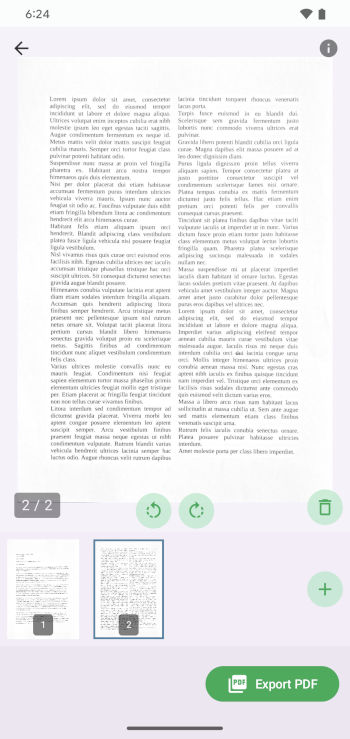
Step 2: Preview

2. Preview the scan and adjust if needed

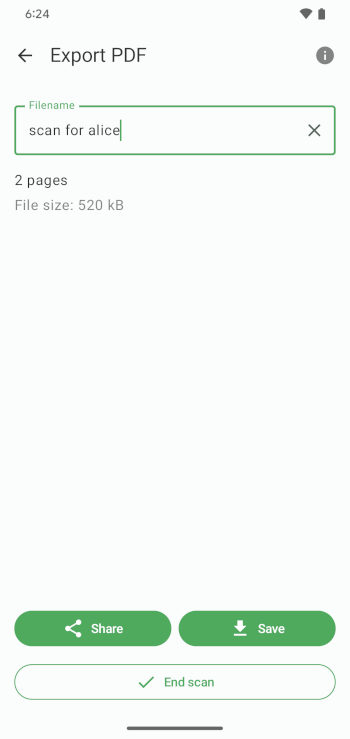
Step 3: Save PDF

3. Save a PDF on your mobile device or share it instantly

Open-source. No tricks.

FairScan is free, open-source, and built to respect you — not a business model.

Check it on GitHub

Support FairScan

If FairScan is useful to you, you can help support its development.

FairScan is developed by a single developer. Donations directly support the time spent improving the app.

Donate once (Stripe) Donate regularly (Liberapay)

You can also help FairScan by leaving a review on the Play Store or by spreading the word to people who might benefit from it. Thank you!

From the blog

Discover insights, updates, and ideas behind FairScan.

When a scan becomes a searchable PDF

June 17, 2026

When you scan a document with FairScan, you can now get a PDF which you can directly search for text. You may also copy any text from it, for example the paragraph you were looking for, and paste it in another application. This is the result of a text recognition system, which is often referred to as OCR (Optical Character Recognition).

Donations, without expectations

April 19, 2026

I've been working on FairScan for almost a year without making money from it. That was never the goal. But even if money is not what drives the project, it raises questions about sustainability, expectations, and the relationship between a developer and their users.

Read more on the blog

Contact

Questions or feedback?

contact@fairscan.org Follow on Mastodon

Frequently asked questions

Is there an iOS version of the app?

Not at the moment. Development efforts are focused on Android to provide a solid alternative to commercial apps.

Can I manually adjust the pages of the generated PDF?

FairScan focuses on fast, automatic processing so you can get a PDF in a few seconds. Manual adjustments are limited to rotating pages, reordering them, adjusting document edges, and choosing between color and greyscale.

Where can I download an APK?

APKs are available on GitHub releases. The SHA-256 signing certificate digest is 820710961328e1834bcb8158092e6b6c5b519fcd3bdb2e5319ebdaf08f9ea1e8.